
1. Instead of having the original user who enrolled the device listed in the "User" column, display the user who is currently logged in or last logged in.

This is currently my #1 wish. I've found that even if I wipe the machine, it still lists the very, very first user who enrolled it. This has to get better somehow. Ideally, there would be a log file [with the device] of: who enrolled originally, who logged in (with IP address and time) in the past and who is currently logged in with that same information.
*Note* I noticed that if I removed the username manually and then I restore the device with a new Chrome Image and enrolled again, it would input that user. I tested this once and really, there's not much use for it anyways.
2. Ability to group devices in their own Org Units separate from the User Org Units.
Something just isn't right with how devices are grouped. Using the same Org Units you use for users for the units you use for devices just doesn't make sense (or am I missing something?). If I were to set up orgs for devices, I would set them up differently than I would for users.
More importantly, it's just plain confusing. For example, let's say I want to enable guest access for a 12th grader. I go to Settings/Chrome Management/Device Settings. I select an organization and I change the guest setting. If you were to look at the screenshot below you would think that you are settings the guest access setting for anyone who is in the org Students/HS/2013.
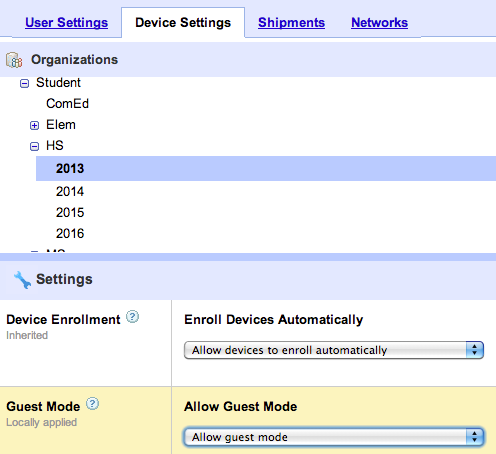

Sure it makes sense that "Device Settings" is for the devices not the users but Google needs to display that better so it's less confusing. People get confused and ask "well which overrides the setting-what if you set a setting for an org of people but the device they're logged into is in another org with a different setting? Which setting gets enforced?" Really, it's not overriding each other because the Device Setting (tab) only allows you to apply a setting to the DEVICES in the highlighted Org, not the users.
If I'm totally missing something, please let me know :). I don't see much talk about others having this issue/frustration so maybe I am lol. I don't know what the answer is in structuring and displaying Orgs and settings but I think it begins with (1.) moving the Device Settings under the Device tab and (2.) having a separate Org structure for devices.
I have struggled with re-structuring my Orgs into two main Orgs Devices and Users and then create each their own structure but I have to think that they are going to add something like this and I didn't want to do all of that work, then the next day it changes :)
3. Ability to see which devices are currently enrolled
There is currently no way to see which devices are truly enrolled. The closest thing looks to be "last synced" which does not accurately reflect if it's enrolled/not enrolled. I've had devices that had a sync date but it wasn't enrolled properly, I've wiped devices which unenrolls them and there's no way to tell. The "Status" says Shipped or Active, which also doesn't give me what I want. All I want is a column that says Enrolled "Yes" or "No".
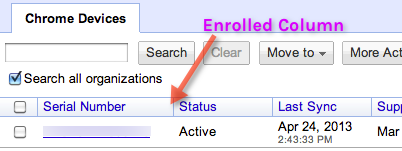
Having history on the device would also be great. For example, device enrolled on Apr 23rd, 2013 by andersonamy@isd271.org on 204.3.245.1, wiped on Apr 24th, 2013, etc.
4. The ability to set the WiFi before a device is enrolled
There is the ability to set a WiFi network/password already but I believe the device has to be enrolled first before it can auto sign onto it. When you first open the device it prompts you to connect to a network, it should auto choose the WiFi network and input the password for you. The device is already in the dashboard so that device should know it's a part of your domain, so why not? *The WiFi settings in the Dashboard seem to only take effect on enrolled devices.*
This would be great for networks that have passwords on it which students don't know. This would make enrollment (by students) possible, making the enrollment process in general easier.
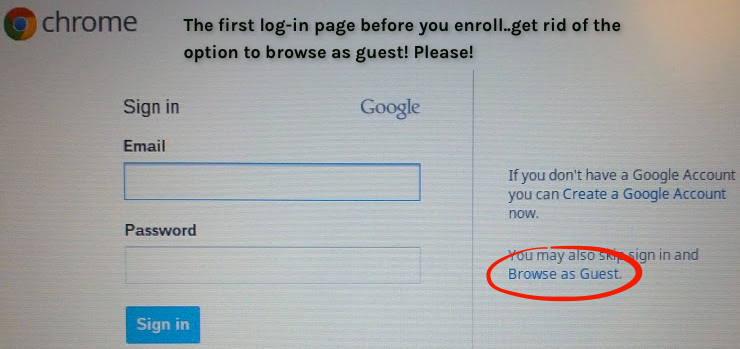
5. Remove "browse as guest" when you get enrollment log in page
Users have the option to browse as guest before enrolling. This has caused a few issues for us because users clicked on that first and it messed up the enrollment process. *The setting to not allow guest access does NOT remove this "browse as guest" link you see below.*
Probably more importantly, it allows users to wipe/restore the machine (students can easily find directions online) and then browse as a guest and use the machine. Part of not allowing guest access and only having @isd271.org accounts able to log in deters theft. We tell people that people "can't even use the device" if they steal it. Well, technically they can.
That's it for now. I plan on prioritizing another 5 later. Do you agree with these - what are you Top 5?
Related posts- Chromebook Dashboard Management: Wish List Part 1
- Chromebook Dashboard Management: Wish List Part 2
- Chromebook Dashboard Management: Wish List Part 3
- Wish List Doc
No comments:
Post a Comment